

TDP is one of the most important settings on a handheld gaming PC, but it is also one of the easiest to misunderstand.
Raise it and a demanding game may run faster. Lower it and your Steam Deck, ROG Ally, Legion Go, or MSI Claw may last longer on battery and run with less fan noise.
The catch is that more watts do not always translate into proportionally more FPS.
That is why the best TDP setting is usually not the highest number your handheld allows. It is the lowest power level that still delivers the frame rate and experience you actually want.
Quick Answer: What Is TDP in Handheld Gaming?
TDP stands for Thermal Design Power. On handheld gaming PCs, the term is commonly used alongside configurable APU power limits and performance modes. Increasing the power budget can improve FPS in games that need more CPU or GPU power, but it also increases energy use and usually means shorter battery life, more heat, and faster fans.
A 15W TDP or APU power setting does not mean the entire handheld consumes only 15 watts. The display, memory, SSD, wireless hardware, cooling system, and other components also use power.
| Power Range | What It Usually Prioritizes | Best Fit |
|---|---|---|
| Around 10W | Efficiency, battery life, quieter operation | Indies, older games, lighter workloads |
| Around 15W | Balance of performance and efficiency | Many everyday handheld workloads |
| Around 20W | More performance headroom | More demanding games |
| 25–30W | Performance first | Demanding games, especially while plugged in |
These ranges are a practical guide, not universal presets. The useful setting depends on the handheld, game, resolution, FPS target, cooling, and whether you are playing on battery or connected to power.
What Does TDP Actually Mean?
Traditionally, TDP describes a processor’s thermal design and power envelope. It should not be treated as a direct measurement of how much electricity an entire PC consumes.
Handheld gaming makes the term a little more confusing because manufacturers expose performance profiles and configurable power controls directly to users. In practice, changing these settings changes how much power the APU can use and therefore changes the balance between performance and efficiency.
The APU combines the CPU and integrated graphics that do most of the heavy lifting in a modern gaming handheld.
Give that chip more power and it may sustain higher clocks when the workload can use them. Restrict the power budget and the system has to work within a tighter envelope.
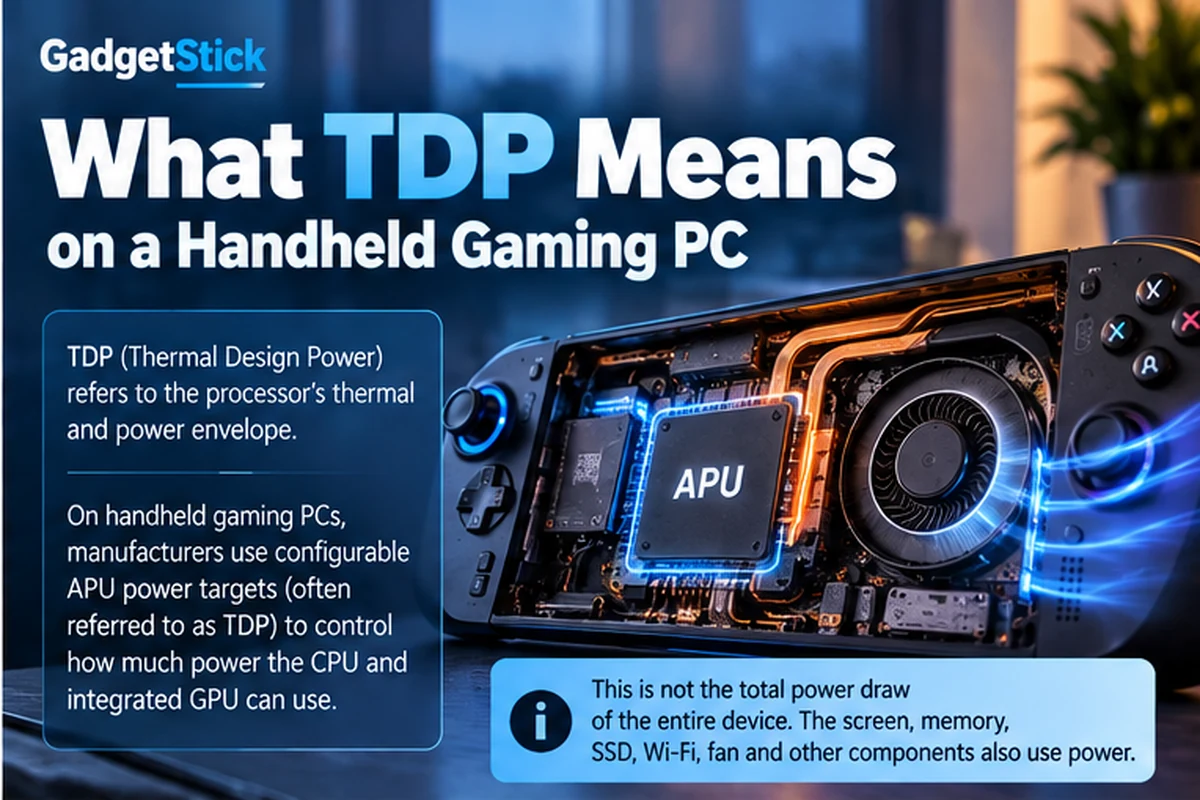
TDP Is Not the Same as Total Handheld Power Draw
This distinction matters when estimating battery life.
If your handheld is running an APU at a 15W power target, other parts of the device are still consuming energy. That includes:
- the display and backlight
- system memory
- the SSD
- Wi-Fi and Bluetooth
- speakers and connected accessories
- the cooling fan
So you should not calculate battery runtime by simply dividing battery watt-hours by the TDP number shown in a performance menu. Real system consumption is higher and changes with the workload.
What Happens When You Increase TDP?
Increasing the available APU power gives the processor more room to sustain performance when a game is power-limited.
Depending on the game and handheld, that can mean:
- higher average FPS
- more stable frame rates in demanding scenes
- higher sustained CPU and GPU clocks
- more room for demanding graphics settings or resolutions
But the trade-off usually includes faster battery drain, additional heat, and more cooling demand.
That trade-off is why maximum TDP should be treated as an option, not a default requirement.
How TDP Affects FPS
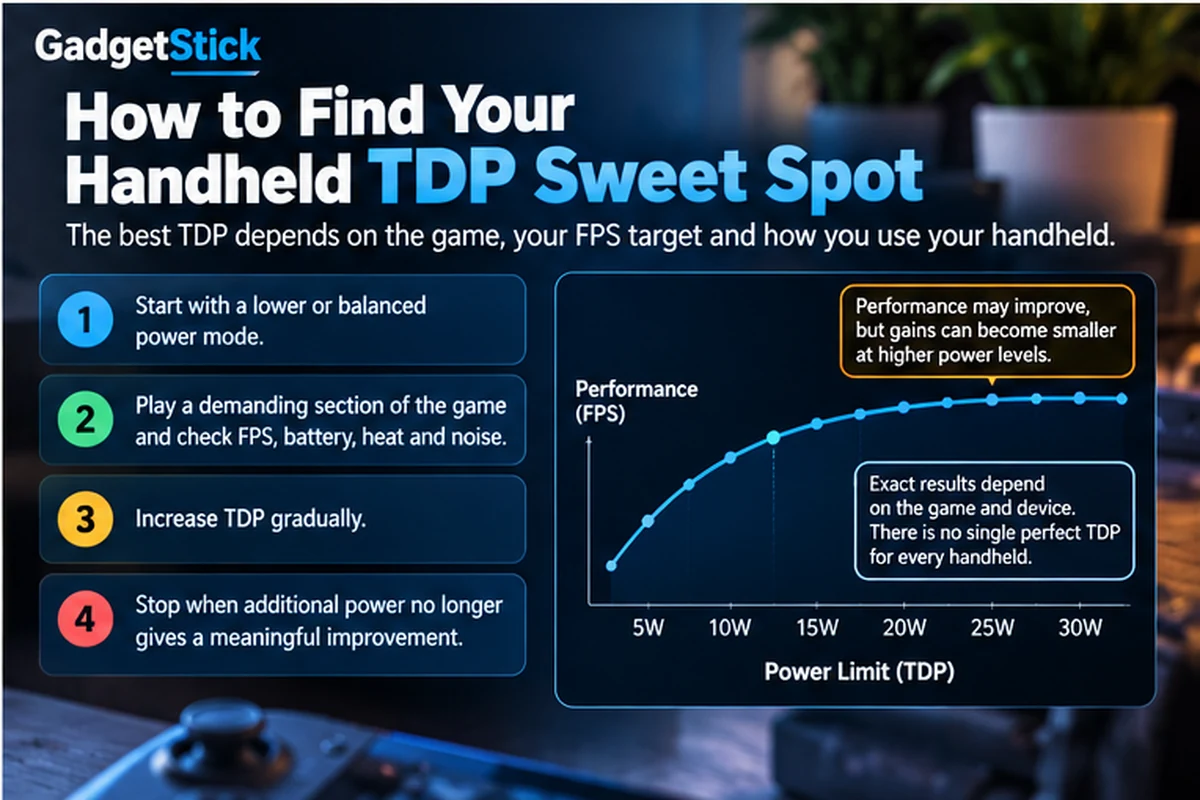
Imagine a game that struggles because the GPU does not have enough power available at 10W. Moving to 15W could produce a noticeable improvement because the APU now has more headroom.
Increasing the limit again may improve performance further, but eventually you reach diminishing returns.
Going from 10W to 15W can make a large difference in one game, while going from 20W to 25W in that same game may produce a much smaller improvement.
There is no reliable rule such as “five extra watts equals ten extra FPS.” Performance scaling depends on:
- the APU and handheld model
- the game engine and workload
- resolution and graphics settings
- your FPS target
- memory bandwidth
- cooling and sustained temperatures
- whether the handheld is plugged in
This is also why comparing two handhelds only by their maximum wattage can be misleading. A newer or more efficient chip may deliver similar performance using less power.
How TDP Affects Battery Life
Battery life is the other half of the TDP equation.
When the processor is allowed to consume more power for a sustained workload, the battery generally drains faster. Lower power modes can trade some performance for longer portable play time.
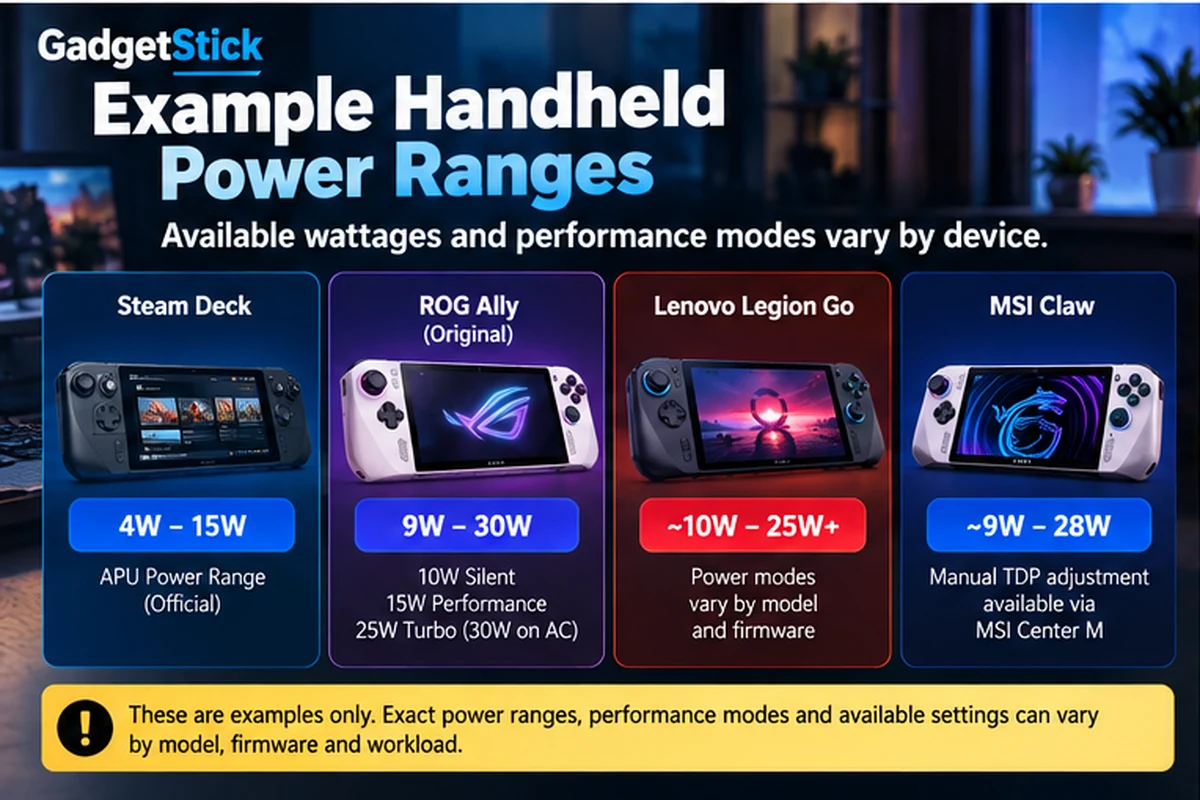
ASUS documents this trade-off on the original ROG Ally with operating modes that include 10W Silent, 15W Performance, and higher-power Turbo operation. Turbo can run at 25W on battery and up to 30W with compatible AC power.
That does not make 15W universally ideal. It simply shows why handheld makers provide different power profiles: the best balance changes with what you are playing and where you are playing it.
10W vs 15W vs 20W vs 25–30W TDP
Around 10W: Efficiency First
Lower power settings make the most sense when a game does not need the full performance of the APU.
Indie games, older titles, emulation, and lighter workloads can sometimes maintain your preferred FPS target at a lower power level. If the game is already smooth, increasing TDP may add battery drain without meaningfully improving the experience.
Lower sustained power can also reduce the amount of heat the cooling system needs to remove, which may help keep fan noise down.
Around 15W: The Middle Ground
For many handheld workloads, the middle of the power range is where performance and efficiency start to balance.
ASUS using 15W for the original ROG Ally’s Performance mode is a useful real-world example, but it should not be interpreted as a universal recommendation.
Some games can run well below 15W. Others benefit noticeably from more.
Around 20W: More Headroom for Demanding Games
Moving toward 20W can help when a demanding game is clearly constrained at lower power settings.
This is also where it becomes important to watch the return you get for each additional watt. If a lower setting already delivers a stable target frame rate, the extra battery cost may not be worthwhile when playing unplugged.
25W to 30W: Performance First
Higher power modes prioritize performance over portable efficiency.
They can make sense for demanding AAA games and are particularly useful when the handheld is connected to power. But a game that already reaches your chosen FPS target at a lower setting does not automatically become better just because you select the maximum mode.
Why Higher TDP Does Not Always Mean Better Gaming
This is the most important part of handheld power tuning.
If a game already holds your 60 FPS target at a lower power level, increasing TDP may not make it feel meaningfully smoother. The extra power can instead show up as higher energy consumption and additional cooling demand.
The same applies when a game is limited by something other than the APU’s available power.
Instead of asking, “How high can I set the TDP?”, ask “What is the lowest power setting that gives me the experience I want?”
That question is much more useful when you are gaming away from a charger.
Steam Deck TDP: Why 15W Can Still Be Enough
Valve lists the Steam Deck APU power at 4W to 15W.
That number may look low beside Windows handhelds advertising modes around 25W or 30W, but maximum wattage alone does not tell you which device will provide the better experience.
The Steam Deck’s hardware, display target, SteamOS environment, and performance controls are designed around its own power envelope.
It is a good example of why TDP numbers should be understood in the context of the complete device rather than used as a standalone performance score.
ROG Ally and Ally X: More Power Flexibility
ASUS gives ROG Ally users a wider range of power behavior through Armoury Crate operating modes and manual tuning on supported configurations.
The original ROG Ally is a particularly clear example because ASUS documents lower-power Silent and Performance modes alongside higher-power Turbo operation.
That flexibility lets the same handheld behave very differently depending on the game. A lightweight title does not need to be treated like a demanding AAA release.
What About Lenovo Legion Go and MSI Claw?
The same principle applies across other PC handheld families: power profiles are part of the performance-management system, but matching wattage does not guarantee matching performance.
Lenovo’s Legion Go family and MSI’s Claw family use their own hardware, cooling, software, and performance controls.
Two handhelds both running around 20W can still deliver different FPS, battery life, temperatures, and fan behavior.
Does Higher TDP Make a Handheld Hotter and Louder?
Higher sustained processor power generally gives the cooling system more heat to manage.
That can lead to faster fan speeds and more audible fan noise, although the exact behavior depends heavily on the handheld’s cooling design and fan curve.
This means TDP can affect more than FPS. It can also change:
- battery drain
- fan noise
- surface temperature
- overall efficiency
Using the official performance modes provided by a manufacturer is not the same thing as forcing unsupported hardware settings. Stay within the controls and limits intended for your specific device.
Does TDP Matter When Your Handheld Is Plugged In?
Yes, but your priorities change.
Battery life becomes much less important when the handheld is connected to power, and some devices can access higher performance profiles with a suitable charger.
The original ROG Ally, for example, can move from a 25W Turbo profile on battery to up to 30W with compatible AC power.
That makes higher power more attractive for plugged-in or docked gaming. Even then, there is little benefit in using extra power if a game already holds your desired frame rate at a lower setting.
How to Find the Best TDP for Your Handheld
Do not copy a wattage number from another device and assume it is automatically ideal for yours.
A better approach is to find the efficiency sweet spot for the game you are actually playing:
- Start with a moderate or lower official power mode.
- Choose the resolution, graphics settings, and FPS target you actually want to use.
- Play a repeatable demanding section of the game.
- Watch frame-rate stability, battery drain, heat, and fan noise.
- Increase the power level gradually if performance is below your target.
- Stop when additional power no longer produces a worthwhile improvement.
If a game already maintains your 40 FPS target at a lower power level, there is little reason to chase 25W simply because your handheld supports it.
The sweet spot can change from game to game.
TDP and FPS Limits Work Better Together
TDP is only one part of handheld optimization.
An FPS cap can be just as important. If your goal is longer battery life, allowing a game to render as many frames as possible can use resources you do not actually need.
Depending on the game and display, targeting 30, 40, or 60 FPS can let you use a lower power level while maintaining consistent gameplay.
Good handheld optimization is therefore about balancing power, FPS, graphics quality, battery life, heat, and noise rather than maximizing a single number.
Common TDP Mistakes to Avoid
Running Maximum Power in Every Game
A lightweight indie game probably does not need the same power budget as a demanding AAA title.
Assuming More Watts Equal the Same FPS Gain
Performance scaling is not linear. The value of another five watts changes with the game and hardware.
Comparing Different Handhelds Only by TDP
A 15W Steam Deck and a different handheld at 15W do not automatically deliver identical performance.
Ignoring Your FPS Target
If you only need a stable 40 FPS, optimizing around that target can be more efficient than chasing the highest frame rate possible.
Treating TDP as Total System Power
The APU power setting is only part of what the complete handheld draws from its battery or charger.
The GadgetStick Pro Tip
Set your frame-rate goal first, then tune power around it.
If you want 40 FPS and the game holds 40 FPS cleanly at a lower power setting, that is usually a better portable configuration than increasing TDP just to create unused performance headroom.
When you plug in, you can switch to a higher performance profile if the game benefits from it. On battery, the lowest stable setting that meets your FPS target is usually the more useful place to start.
If you are still deciding whether battery life, fan noise, and performance compromises make sense for you, our guide to whether handheld gaming PCs are worth it looks at the bigger buying decision.
Frequently Asked Questions
What does TDP mean in handheld gaming?
TDP stands for Thermal Design Power. On handheld gaming PCs, the term is commonly used with configurable APU power limits and performance modes that influence the balance between FPS, battery life, heat, and fan noise.
Is higher TDP always better for gaming?
No. Higher power can improve performance when a game is power-limited, but gains eventually diminish. If a game already reaches your target FPS at a lower setting, extra power may mainly increase energy use and cooling demand.
Does lowering TDP increase battery life?
Generally, reducing the APU power budget can reduce system power consumption and extend battery runtime. Actual battery life also depends on the display, game, frame rate, wireless activity, and other hardware.
Is 15W TDP good for handheld gaming?
It can be a useful balanced setting on some handhelds, but 15W is not universally optimal. Lightweight games may run well below it, while demanding games may benefit from higher power.
Does TDP affect fan noise?
It can. Higher sustained processor power usually creates more heat for the cooling system to remove, which can lead to higher fan speeds. The exact noise level depends on the handheld’s cooling design and fan curve.
Can increasing TDP damage a handheld gaming PC?
Using manufacturer-provided performance modes and supported controls is different from unsupported hardware modification. Stay within the power ranges and controls intended for your specific model rather than copying settings designed for another device.
What is the difference between TDP and total power consumption?
TDP or a configurable APU power limit relates to the processor’s power and thermal envelope. Total system consumption also includes the display, memory, storage, cooling, wireless hardware, and other components, so complete device power draw can be higher than the TDP number shown in a performance menu.
Final Answer
TDP is one of the main controls behind the performance-versus-battery-life trade-off on a handheld gaming PC.
Increasing the available APU power can improve FPS when a game needs more performance, but it also uses more energy and can increase heat and fan activity. Once you reach your target frame rate, additional watts may offer little practical benefit.
There is no single best TDP for every Steam Deck, ROG Ally, Legion Go, MSI Claw, or every game. For portable play, start lower and increase power until the game reliably reaches the performance you want. When plugged in, higher modes make more sense if the game can actually use the extra headroom.
The useful goal is not maximum TDP. It is the best balance of FPS, battery life, heat, and fan noise for the game you are playing.
How We Researched This Guide
This guide was built from manufacturer documentation and technical specifications for current handheld gaming platforms, with emphasis on how power modes are presented to real users rather than treating TDP as a simple benchmark score.
We cross-checked Valve’s published Steam Deck APU power range, ASUS operating-mode documentation for the ROG Ally family, and official product information from Lenovo and MSI. We also separated APU power settings from total system power consumption because those figures are often incorrectly treated as interchangeable.
GadgetStick does not claim hands-on FPS, battery, temperature, or fan-noise results unless a device has actually been tested by our team. Performance examples in this guide are explanatory rather than fabricated benchmarks.
Primary Sources Reviewed
- Valve — Steam Deck technical specifications
- ASUS ROG — ROG Ally specifications and operating modes
- Lenovo — Legion Go product information
- MSI — Claw handheld product information
Editorial Note
Power modes, firmware behavior, and available manual controls can change with device generation and software updates. GadgetStick uses manufacturer documentation as the primary reference and avoids presenting one wattage as universally optimal across different handhelds. This guide is written for US readers and focuses on consumer-facing handheld PC usage rather than processor engineering specifications alone.
