
A gaming laptop and a handheld gaming PC can both run full PC games, travel with you, and cost enough that choosing the wrong one hurts.
But they solve portability in very different ways.
A gaming laptop gives you a larger display, stronger sustained performance, a keyboard, more ports, and much better productivity potential. A handheld gaming PC gives you instant couch, bed, commute, and travel play in a device built around gamepad controls.
If you are deciding between the two in 2026, the useful question is not which category is “better.” It is which compromises fit the way you actually play.
Quick Answer: Gaming Laptop vs Handheld Gaming PC
| If you care most about… | Better fit |
|---|---|
| Raw gaming performance | Gaming laptop |
| Playing anywhere with minimal setup | Handheld gaming PC |
| Big screen and keyboard/mouse games | Gaming laptop |
| Couch, bed, commute, travel gaming | Handheld gaming PC |
| School/work plus gaming | Gaming laptop |
| Console-like pick-up-and-play feel | Handheld gaming PC |
| Long upgrade path for RAM/storage | Depends on model, but laptops usually offer more options |
| Lowest weight in your hands-free bag | Handheld gaming PC |
| Competitive shooters / strategy / simulation | Gaming laptop |
| Indie, RPG, emulation, portable backlog | Handheld gaming PC |
For many buyers, a handheld is a second gaming device. A gaming laptop is more often the one portable PC expected to handle both gaming and everyday computer work.
The Biggest Difference: Sustained Power
This is the technical difference that shapes almost everything else.
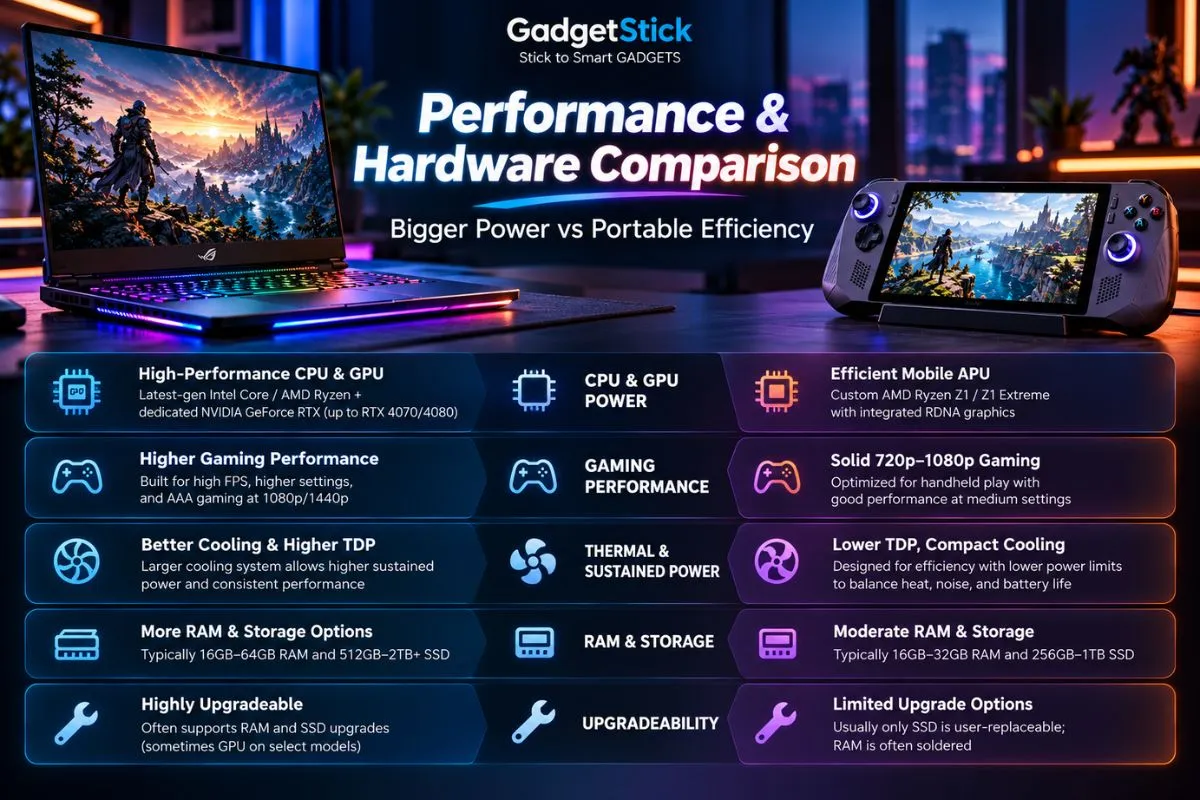
Handheld PCs are designed to run within tight power and thermal limits because they sit in your hands. Valve lists the Steam Deck APU at 4–15W, while ASUS lists the ROG Ally X at a 9–30W TDP range. Modern gaming laptops can dedicate far more power to the GPU alone.
NVIDIA’s current RTX 50-series laptop lineup spans GPU subsystem power ranges that can reach 100W on an RTX 5070 Laptop GPU and up to 150W on higher-end models.
That does not make every gaming laptop automatically fast, because laptop cooling, GPU power limits, CPU choice, and manufacturer tuning still matter. But the basic performance ceiling is much higher.
Official references: Valve Steam Deck technical specifications, ASUS ROG Ally X specifications, and NVIDIA RTX 50 Series Laptop GPUs.
Performance: Gaming Laptops Have the Higher Ceiling
If your priority is frame rate, higher settings, ray tracing, high-resolution gaming, or demanding new AAA releases, a gaming laptop generally has the advantage.
The reason is not just “a laptop has a bigger GPU.” It has more room for cooling, a larger power budget, and often dedicated graphics memory instead of sharing system memory with an integrated GPU.
A handheld can still deliver a great experience by targeting lower resolutions, lower settings, upscaling, and tighter power envelopes. That is a smart trade when the screen is only around seven inches.
But if you connect both devices to a large external monitor, the laptop’s extra GPU headroom becomes much more obvious.
Portability: Handhelds Win the Moment You Leave the Desk
Gaming laptops are portable computers. Handhelds are portable game machines.
That distinction matters more than the raw weight number.
A handheld can be used while sitting on a sofa, lying in bed, waiting at an airport, or riding on a train without opening a table, connecting a mouse, or balancing a full laptop on your knees.
Current examples stay compact despite increasingly powerful hardware. Valve lists the Steam Deck at about 669 grams, while ASUS lists the ROG Xbox Ally X at 715 grams.
A gaming laptop may still fit in a backpack, but the charger, mouse, larger chassis, and need for a surface make the total setup less spontaneous.
Battery Life: The Comparison Is More Complicated Than It Looks
Neither category should be judged only by the size of its battery.
Handhelds are built around much lower power targets, while gaming laptops can pull dramatically more power when their CPU and dedicated GPU are working hard.
Valve lists two to eight hours of gameplay for the original Steam Deck configuration depending on workload. ASUS gives the ROG Xbox Ally X an 80Wh battery, which is unusually large for a handheld.
Gaming laptops often carry batteries around the airline-friendly upper limit, but demanding games can still drain them quickly because the hardware has a much larger power budget.
The practical difference is that handhelds are designed around battery gaming. Gaming laptops are usually at their best when plugged in.
Display Size vs Display Convenience
| Display factor | Gaming laptop | Handheld gaming PC |
|---|---|---|
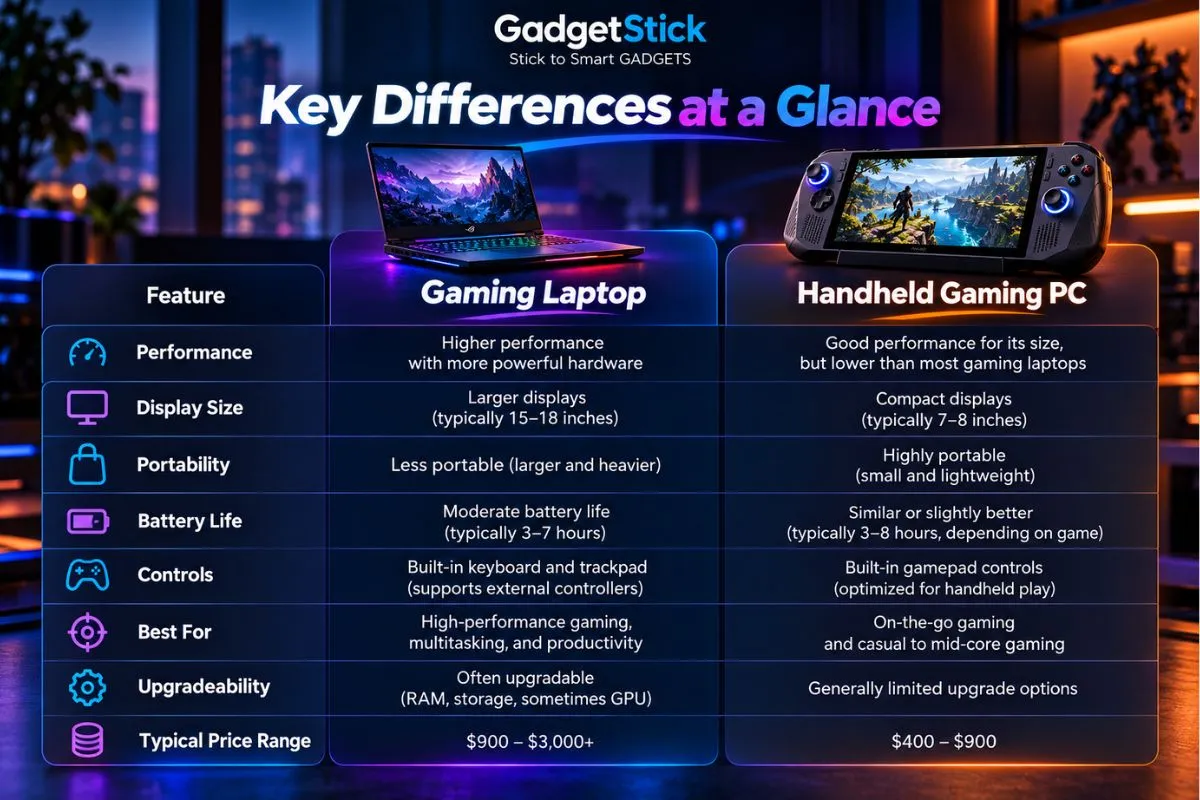
| Typical size | 14–18 inches | Around 7–8 inches |
| Resolution target | 1080p to 1600p+ common | 800p to 1080p common |
| Viewing distance | Desk / lap | Held close |
| Competitive visibility | Better | More limited |
| Travel convenience | Good | Excellent |
| External monitor use | Natural fit | Possible, but less seamless |
A larger laptop screen makes text-heavy games, strategy titles, competitive shooters, and productivity easier. A handheld screen looks small on paper, but because it sits much closer to your eyes, it can still feel immersive for single-player games.
Controls: Built-In Gamepad vs Keyboard and Trackpad
Handheld gaming PCs are designed around analog sticks, triggers, face buttons, and haptics. Some models add trackpads, rear buttons, gyro, or programmable controls.
That makes controller-friendly games feel immediately natural.
A laptop gives you a full keyboard and trackpad, which is better for launchers, mods, typing, strategy games, MMOs, productivity, and anything designed around mouse input. For serious gaming, most laptop users still add a gaming mouse or controller.
If the games you play already feel best with a controller, a handheld has a major usability advantage.
Windows Handheld vs SteamOS: Software Matters
Not all handheld gaming PCs behave the same way.
Steam Deck uses SteamOS, which is optimized around a console-like game library and controller-first interface. Windows handhelds such as the ROG Ally family give you broader compatibility with launchers and PC software but can expose more of the normal Windows desktop experience on a small screen.
Gaming laptops usually run Windows in the environment it was designed for: keyboard, pointer, full-size display, and conventional desktop apps.
That makes laptops easier if you constantly switch between games, browsers, Discord, Office, creative apps, and other PC tasks.
Can a Handheld Replace a Gaming Laptop?
For some buyers, yes. For many, not completely.
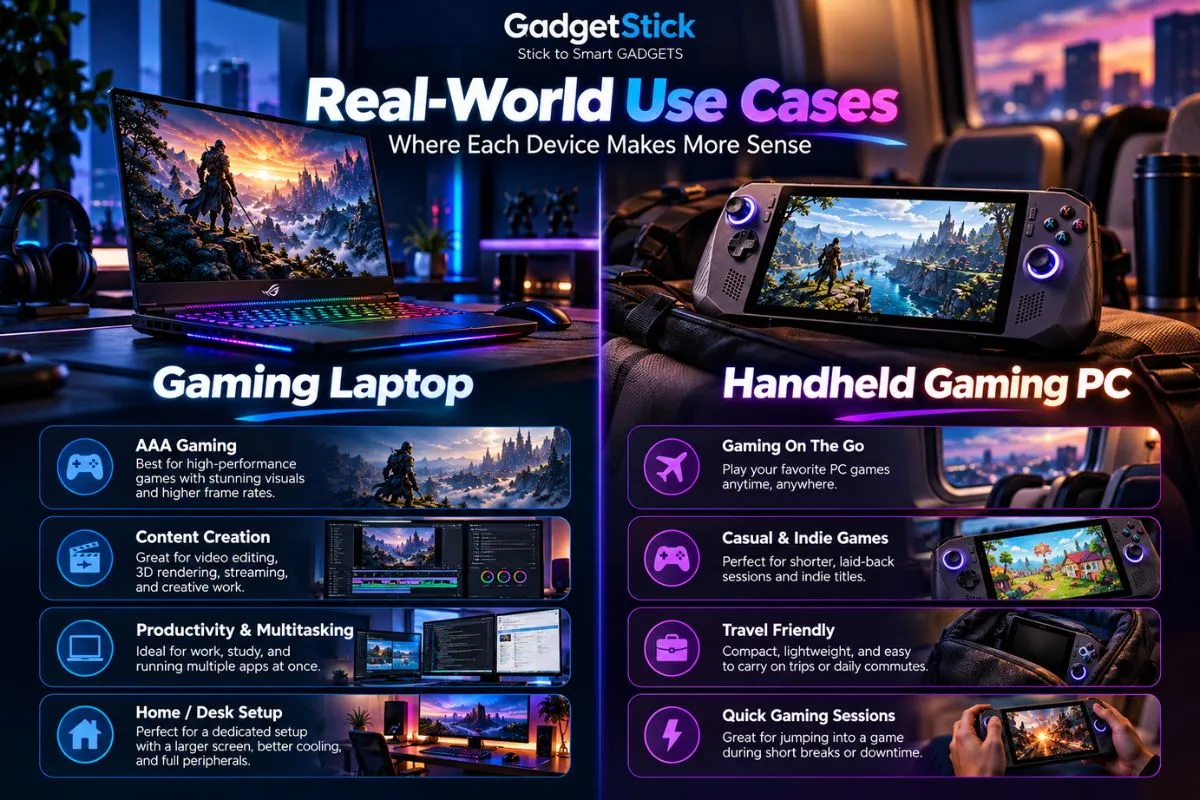
A handheld can replace a laptop if your portable PC use is almost entirely gaming and you already have another computer for work or school.
It is much harder to replace a laptop if you need:
- a full keyboard for daily typing
- a large screen for work or study
- high frame rates in demanding AAA games
- competitive mouse-and-keyboard gaming
- video editing, 3D work, or other GPU-heavy productivity
- multiple ports and peripherals without a dock
If you are mainly wondering whether the handheld category itself makes sense, read our guide to whether handheld gaming PCs are worth it in 2026.
Can a Gaming Laptop Replace a Handheld?
Technically, yes. Experientially, not really.
A laptop can run the same games and usually run them faster, but it cannot recreate the convenience of pressing a power button and playing comfortably on a couch, in bed, or during a short travel window.
That convenience is why handheld owners often use them even when a more powerful desktop or laptop is only a few rooms away.
Value: Compare the Whole Setup, Not Just the Sticker Price
A cheap handheld can look like the obvious value option until you add a dock, larger SSD, microSD card, case, charger, keyboard, mouse, or external display.
A gaming laptop costs more upfront but already includes a large screen, keyboard, trackpad, speakers, webcam, battery, and full desktop operating environment.
On the other hand, if you already own a desktop PC and only want portable access to your game library, paying for another full laptop may be unnecessary.
Value depends on what equipment you already own and what role the new device needs to fill.
Upgradeability and Repairability
Neither category is a desktop PC, but laptops usually provide more room for serviceable parts.
Many gaming laptops allow SSD upgrades, and some still use replaceable RAM modules. Handhelds increasingly use standard M.2 SSD formats, but memory is typically soldered and internal access is tighter.
ASUS, for example, moved the ROG Xbox Ally X to a full-size M.2 2280 SSD, which makes storage upgrades more familiar than on many earlier handhelds.
Always check the exact model before buying because thin gaming laptops can also use soldered memory.
Which One Is Better for Different Types of Games?
| Game type | Better fit | Why |
|---|---|---|
| Competitive FPS | Gaming laptop | Larger display, mouse input, higher performance ceiling |
| Strategy / RTS | Gaming laptop | Keyboard, mouse, larger UI |
| MMO | Gaming laptop | More keys and easier multitasking |
| Indie games | Handheld | Low hardware demand and excellent portability |
| Turn-based RPG | Handheld | Great for couch and travel play |
| Emulation | Handheld | Controller-first form factor suits classic games |
| AAA single-player | Depends | Laptop for fidelity; handheld for convenience |
| Racing / sports | Handheld or laptop + controller | Both work well depending on screen preference |
Who Should Buy a Gaming Laptop?
- You need one machine for gaming, work, school, or creative tasks.
- You care about high frame rates and higher graphics settings.
- You play competitive shooters, MMOs, strategy games, or simulation titles.
- You want a larger screen without carrying a separate monitor.
- You frequently use a keyboard and mouse.
- You expect your portable PC to behave like a full workstation.
Who Should Buy a Handheld Gaming PC?
- You already own another computer and mainly want portable gaming.
- You play on the couch, in bed, during travel, or away from a desk.
- Your library includes indie games, RPGs, emulation, and controller-friendly titles.
- You value instant access more than maximum graphics settings.
- You are comfortable lowering resolution or settings for portability.
- You want a device that feels closer to a console than a laptop.
GadgetStick Pro Tip
If this will be your only PC, a gaming laptop is usually the safer purchase because it can handle far more than gaming.
If you already have a capable desktop or laptop and want gaming to fit into more places and shorter sessions, a handheld makes much more sense.
The easiest way to avoid buyer’s remorse is to decide what role the device needs to fill before comparing processors, GPUs, or screen specs.
Frequently Asked Questions
Is a handheld gaming PC cheaper than a gaming laptop?
Often, but not always. Entry handhelds can cost less, while premium Windows handhelds can overlap with budget and midrange gaming laptops. Accessories can also change the total cost.
Is a gaming laptop more powerful than a handheld PC?
In most cases, yes. Gaming laptops have larger power and cooling budgets and can use dedicated laptop GPUs that operate far above typical handheld power limits.
Can a handheld gaming PC play AAA games?
Yes, many can. You may need lower resolution, lower graphics settings, upscaling, or frame-rate targets that are below what a gaming laptop can comfortably deliver.
Can I connect a handheld gaming PC to a monitor?
Yes, many handhelds support external displays over USB-C, often through a dock or adapter. That can turn the handheld into a small desktop-style setup.
Which is better for college: gaming laptop or handheld?
If you need one device for classes and gaming, a gaming laptop is much more practical. A handheld works better as a second device when you already have another computer for schoolwork.
Which lasts longer: a gaming laptop or handheld?
There is no universal answer. Longevity depends on build quality, battery wear, cooling, repairability, storage, performance expectations, and whether future games still run well at acceptable settings.
Final Answer
Choose a gaming laptop if you want one portable machine that can deliver stronger gaming performance, a larger screen, keyboard-and-mouse flexibility, and real productivity capability.
Choose a handheld gaming PC if convenience is the priority and you want to play your PC library in places where opening a laptop would feel like work.
The categories overlap more than ever in 2026, but they are still optimized for different jobs. A laptop is a portable computer that games. A handheld is a gaming device that happens to be a PC.
How We Researched This Comparison
We compared the current design priorities and official specifications of major handheld and laptop platforms rather than treating one specific model as representative of the entire category.
For handheld power, battery, size, controls, and connectivity, we referenced current Valve Steam Deck and ASUS ROG Ally family specifications. For gaming-laptop GPU power ranges and current dedicated graphics capability, we referenced NVIDIA’s RTX 50-series laptop specifications.
We also reviewed the current US search results for the gaming laptop vs handheld PC query to identify the practical buyer questions competing pages answer — performance, portability, battery life, controls, value, and replacement potential — then structured this guide around those decisions without claiming first-hand testing.
Editorial Note
Exact performance, battery life, pricing, and upgradeability vary widely by model. Always compare the specific laptop and handheld you are considering rather than applying a category-level conclusion to every device.
