
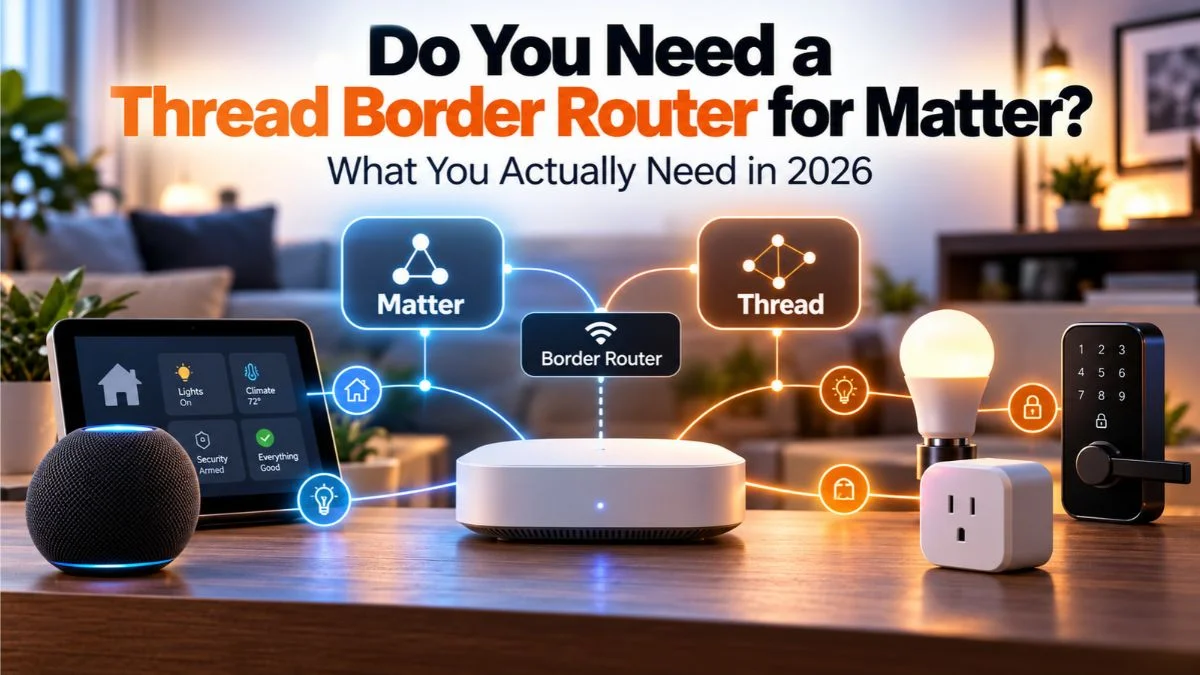
If you are buying a Matter smart-home device in 2026, there is a good chance you will see the words Matter, Thread, border router, and hub used almost interchangeably.
They are not the same thing.
That is the source of most of the confusion. A Matter device can use Wi-Fi, Ethernet, or Thread. Only Matter devices that communicate over Thread need access to a Thread border router.
And you may already own one without realizing it.
Quick Answer: Do You Need a Thread Border Router for Matter?
Only if the Matter device you want to use connects over Thread. Matter-over-Wi-Fi and Matter-over-Ethernet devices do not need a Thread border router.
| Your device | Need a Thread border router? | What you need instead |
|---|---|---|
| Matter over Thread | Yes | A compatible Thread border router plus a Matter controller |
| Matter over Wi-Fi | No | Wi-Fi and a Matter controller |
| Matter over Ethernet | No | Ethernet and a Matter controller |
| Thread device without Matter | Usually yes for Thread networking | A compatible Thread border router plus the protocol/controller that device uses |
| Matter Bridge | Not necessarily | Depends on how the bridge connects to your network |
The key question is not “Does it support Matter?” It is “How does this Matter device connect?”
Matter, Thread, a Border Router, and a Smart-Home Hub Are Different Things
These terms describe different layers of the system.
| Term | What it does | Simple way to think about it |
|---|---|---|
| Matter | The smart-home application standard that lets compatible devices work across ecosystems | The common language |
| Thread | A low-power IPv6 mesh network used by many smart-home devices | The local transport network |
| Thread border router | Connects the Thread mesh to your regular IP network such as Wi-Fi or Ethernet | The gateway between Thread and your LAN |
| Matter controller | Commissions and controls Matter devices inside an ecosystem | The brain that manages Matter devices |
| Smart-home hub | A broad marketing term that may include one or several of these roles | Depends on the product |
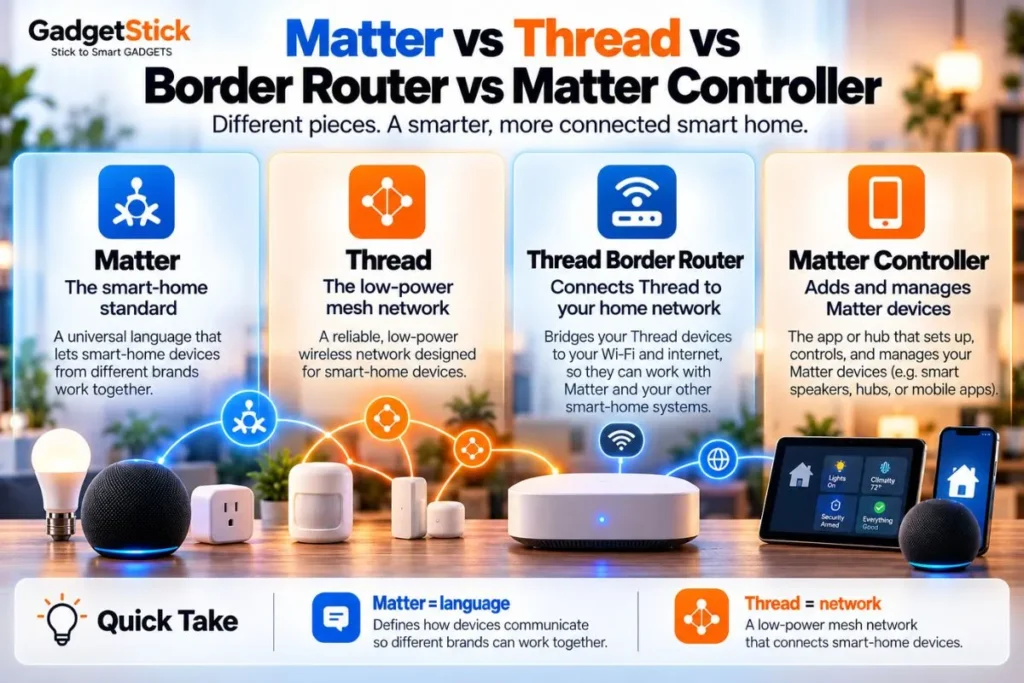
Home Assistant’s current documentation makes an important distinction: a Thread border router forwards network traffic, but it does not control the device. Control is handled by an application-layer protocol such as Matter or HomeKit.
Official reference: Home Assistant Thread documentation.
Matter Over Wi-Fi vs Matter Over Thread
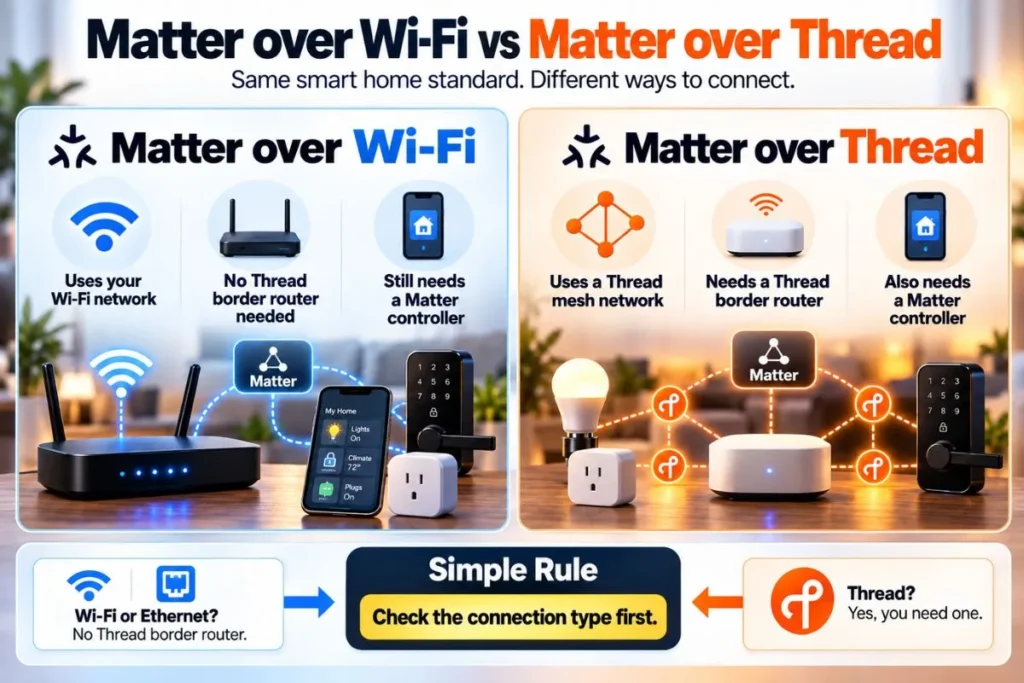
Matter Over Wi-Fi
A Matter-over-Wi-Fi device joins your normal Wi-Fi network. It still needs a compatible Matter controller, but it does not need a Thread border router. For the practical outage side, see what happens to smart plugs when Wi-Fi or internet goes down.
Common examples can include smart plugs, bulbs, appliances, cameras, and other devices that already have Wi-Fi radios.
Matter Over Thread
A Matter-over-Thread device joins a Thread mesh instead of your Wi-Fi network. That Thread network needs at least one border router to reach the rest of your IP network.
Thread is especially useful for low-power devices such as sensors, locks, buttons, and other accessories that benefit from mesh networking and lower power consumption.
Home Assistant’s current Matter documentation explicitly says Thread-based Matter devices need a Thread network with at least one Thread border router nearby.
Official reference: Home Assistant Matter documentation.
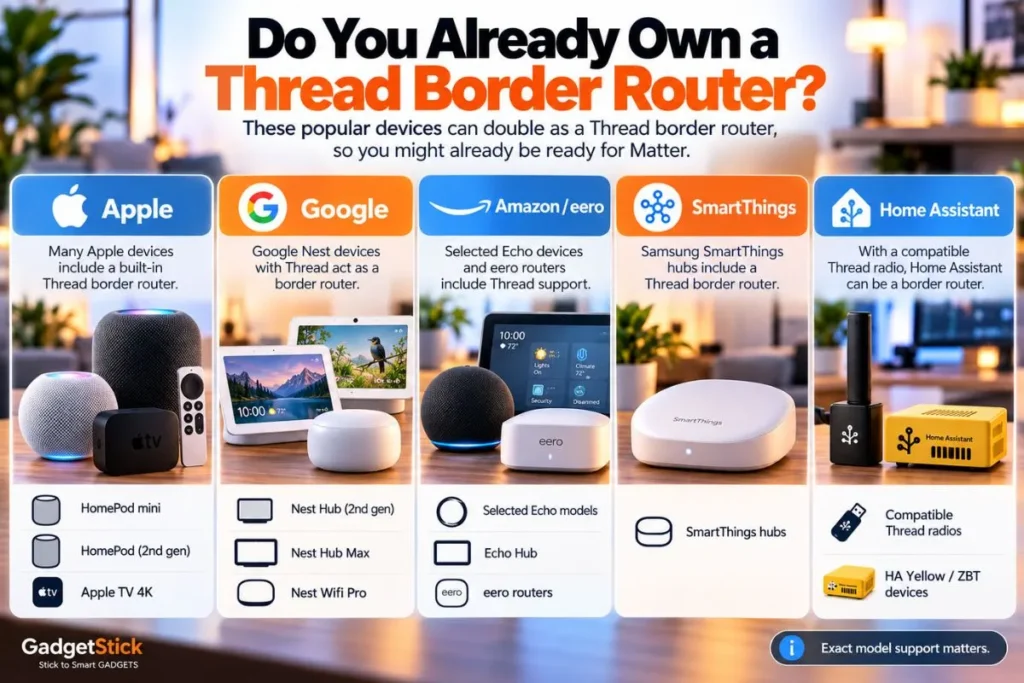
Do You Already Own a Thread Border Router?
Possibly. Many smart speakers, displays, routers, and streaming devices now include Thread border-router capability as a secondary feature.
The exact model and generation matter, so do not assume that every device in a product family supports Thread.
Apple
Apple currently lists the following as Thread-enabled options for its smart-home ecosystem:
- HomePod mini
- HomePod (2nd generation)
- Apple TV 4K (2nd generation)
- Apple TV 4K (3rd generation) Wi-Fi + Ethernet
Apple also says Thread-enabled Matter accessories require a Thread-enabled home hub or a compatible third-party Thread border router.
Official reference: Apple home hub and Matter support.
Google / Nest
Google currently lists these devices as Thread border routers for Google Home:
- Nest Hub (2nd generation)
- Nest Hub Max
- Nest Wifi Pro
- Google TV Streamer (4K)
Google’s Android support documentation also notes that a Thread-capable Android device can join an existing Thread network, but that does not mean every Android phone replaces a dedicated home border router for your smart-home setup.
Official reference: Google Thread support.
Amazon Echo and eero
Amazon currently supports Thread border-router functionality on selected Echo and eero models, including Echo (4th Gen), Echo Hub, selected Echo Show and Echo Studio models, plus several eero generations.
Amazon’s 2026 developer documentation distinguishes between Matter-enabled Echo devices and the smaller subset that also include a Thread border router. That distinction matters: a device can be a Matter controller without being a Thread border router.
Official reference: Amazon Thread support.
Samsung SmartThings
SmartThings supports Matter and can work with Thread through compatible SmartThings hubs or a third-party Thread border router.
Samsung’s support documentation notes that older SmartThings 2015 hubs need a third-party Thread border router to connect Thread devices through Matter.
Official reference: SmartThings Matter integration.
Home Assistant
Home Assistant can work with existing third-party border routers from Apple, Google, and others, or it can be configured as a Thread border router with compatible Thread radios.
Home Assistant Yellow, Connect ZBT-1, and Connect ZBT-2 can use their Thread radio, but Home Assistant notes that these devices do not ship with Thread enabled by default; setup requires the OpenThread Border Router app and manual configuration.
Official reference: Home Assistant Thread setup.
Matter Controller vs Thread Border Router: Why People Mix Them Up
Many modern smart-home devices perform more than one job. A HomePod mini, for example, can act as both an Apple home hub and a Thread-enabled component in the network. Selected Echo and eero devices can be Matter controllers and Thread border routers.
Because those roles are packaged into the same box, it is easy to assume they are the same technology.
They are not.
| Role | Matter controller | Thread border router |
|---|---|---|
| Adds and manages Matter devices | Yes | No |
| Routes Thread traffic to the LAN | No | Yes |
| Needed for Matter-over-Wi-Fi | Yes | No |
| Needed for Matter-over-Thread | Yes | Yes |
| Can be built into the same device | Yes | Yes |
This is why buying “a Matter hub” without checking its Thread capability can still leave you unable to pair a Matter-over-Thread accessory.
How to Tell Whether a Matter Device Uses Thread
Before buying, check the product page, packaging, or technical specifications for the connection type.
- Look for the Matter logo.
- Look for a Thread logo or the words “Matter over Thread.”
- Check whether the product lists Wi-Fi, Ethernet, or Thread as its network connection.
- Do not assume that a Thread logo automatically means Matter support.
- Do not assume that every Matter product uses Thread.
Home Assistant specifically warns that Thread support does not automatically mean Matter support. Some Thread devices use HomeKit or another application protocol instead.
Do You Need to Buy a Separate Thread Border Router?
Not if you already own a compatible device that can perform that job.
A separate purchase makes sense when:
- you want to add Matter-over-Thread devices and do not already have a compatible border router
- your current smart-home controller supports Matter but not Thread
- you want better Thread coverage in a larger home
- you are building a Home Assistant setup and want local control over your own Thread network
- you need redundancy because your existing border router is poorly located or unreliable
Thread can support multiple border routers on the same network. That can improve coverage and reduce reliance on a single gateway, although cross-ecosystem Thread network management can still be more complicated than the marketing suggests.
Can You Have More Than One Thread Border Router?
Yes. Thread is designed to support multiple border routers.
That can be useful because border routers can improve network reach and avoid a single point of failure.
The practical complication is that different ecosystems may create separate Thread networks with different credentials. Home Assistant currently documents that users can end up with separate Apple, Google, and Home Assistant Thread networks in the same home.
So “more border routers” does not automatically mean “one unified Thread mesh.” The setup depends on how credentials are shared between ecosystems.
What If You See “Thread Border Router Required”?
That message usually means the device you are trying to add is using Thread and your current setup does not have a reachable compatible border router, or your phone/controller does not have the correct Thread network credentials.
Try this checklist:
- Confirm the accessory really uses Matter over Thread.
- Make sure your Thread border router is powered on and connected to the same home network.
- Verify that your exact hub/speaker/router model supports Thread, not just Matter.
- Restart the border router and the accessory.
- Move the accessory closer to the border router during setup.
- Update the border router, phone, and accessory firmware.
- If you use multiple ecosystems, check whether the Thread credentials have been shared or imported correctly.
Home Assistant’s Matter documentation uses the exact error “this device requires a border router” for Thread-based Matter devices when the required border-router path is missing.
A Simple Decision Tree Before You Buy Anything
- Check whether the device is Matter over Wi-Fi or Matter over Thread.
- If it is Matter over Wi-Fi, you do not need a Thread border router.
- If it is Matter over Thread, check whether you already own a compatible Thread border router.
- If you do, use that existing device first.
- If you do not, choose a border router that fits the ecosystem you already use.
- Only add more border routers later if you actually need better coverage or redundancy.
Common Mistakes to Avoid
Buying a “Matter hub” and assuming it includes Thread
Matter controller support and Thread border-router support are separate capabilities.
Assuming every Apple TV, Echo, Nest device, or SmartThings hub has Thread
Generation and model matter. Always check the exact product.
Assuming Thread means Matter
Thread is a network protocol. A Thread device can use Matter, HomeKit, or another application protocol.
Buying a new border router when you already own one
This is common because Thread support is often hidden inside speakers, streaming boxes, routers, and displays.
Expecting separate Thread ecosystems to merge automatically
They may not. Credential sharing and network unification still depend on ecosystem support and setup.
Frequently Asked Questions
Do all Matter devices need a Thread border router?
No. Only Matter devices that communicate over Thread need one. Matter-over-Wi-Fi and Matter-over-Ethernet devices do not.
Is a Thread border router the same as a Matter controller?
No. The Matter controller manages Matter devices. The Thread border router moves network traffic between a Thread mesh and your normal IP network.
Can a single device be both?
Yes. Many smart-home hubs, speakers, displays, and routers combine multiple roles in one product.
Does HomePod mini work as a Thread border router?
Apple lists HomePod mini as a Thread-enabled home hub for Thread-based Matter accessories.
Does every Echo work as a Thread border router?
No. Amazon supports Matter on many Echo models, but only selected Echo and eero models include a Thread border router.
Can I use Matter without Thread?
Yes. Matter can run over Wi-Fi or Ethernet as well as Thread.
Can I use Thread without Matter?
Yes. Thread is only the network layer. Some Thread devices use HomeKit or another application protocol instead of Matter.
Do I need more than one Thread border router?
Not necessarily. One compatible border router can be enough for a small setup. Additional border routers can help coverage and redundancy in larger homes.
Final Answer
You do not need a Thread border router just because a smart-home device supports Matter.
You need one when the device uses Matter over Thread. If the device uses Matter over Wi-Fi or Ethernet, a Thread border router is unnecessary.
Before buying extra hardware, check what you already own. A HomePod mini, compatible Apple TV 4K, Nest Hub, Nest Wifi Pro, selected Echo or eero device, SmartThings hardware, or Home Assistant setup may already provide Thread border-router capability.
The safest buying rule is simple: identify the connection type first, then buy only the infrastructure that connection actually needs.
How We Researched This Guide
We checked current official documentation from Apple, Google, Amazon, Samsung SmartThings, and Home Assistant to verify the difference between Matter controllers and Thread border routers, current device examples, and current setup requirements for Matter-over-Thread devices.
We also cross-checked Home Assistant’s current Thread and Matter documentation because it clearly separates Thread networking from Matter device control and documents how multiple vendor Thread networks can coexist.
Device capabilities can vary by generation, region, firmware, and software version, so this guide avoids treating an entire product family as Thread-enabled unless current documentation supports that claim.
Editorial Note
Matter and Thread support continues to evolve through firmware updates and new hardware revisions. Always verify the exact model number before buying a hub, speaker, router, or streaming device specifically for Thread support.
